Vessels

This catalog shows all the vessels with which the company works
- Show all vessels, including those that were added by the seafarers when filling out the online questionnaire;
- Add a new entry;
- Show/Hide the Filter panel;
- Number of seafarers at the planning stage;
Vessel profile

- General Information.
- Crew on board.
- Opening the Planning module for this vessel.
- Requirements.
- Candidates.
- Files.
General Information
This section contains the main parameters of the vessel.
Vessel Crew

The list of seafarers who are assigned to this vessel and are in the process of boarding the ship, or are already on board.
Requirements
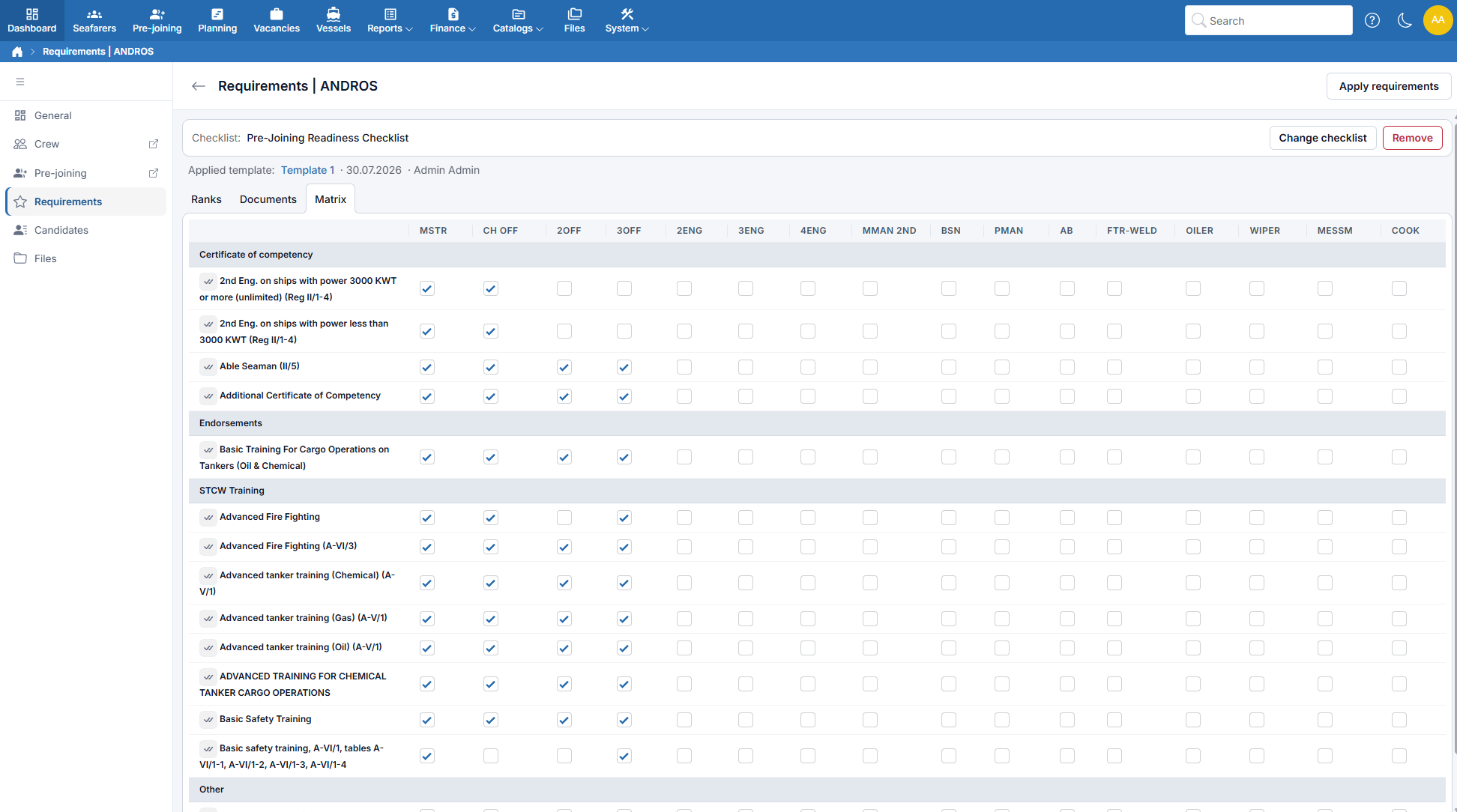
Prefer to see it in action? Follow the interactive tour: Configure Vessel Crew Requirements — it shows how to build a requirements template and apply it to a vessel.
This section contains:
- The list of positions and their number on the ship.
- The general list of required documents.
- The "documents-positions" matrix (i.e. which document is required for each position).
- The payroll and invoice payments and rates for each position.
Use Ranks to select positions and their required numbers, Documents to choose documents and validity requirements, and Matrix to mark which documents are mandatory for each rank. Use Payments, Payroll Rates, and Invoice Rates to configure the payments for the vessel's ranks. Click Save changes to save the requirements.
Payments
The Payments, Payroll Rates, and Invoice Rates tabs set the default payments for each rank on this vessel. Payment types are maintained under Catalogs → Payment Types. Payroll payments and invoice charges are configured separately.
- Select the required ranks on Ranks.
- Open Payments. For each payment type, select the Payroll or Invoice checkboxes under Travel on, Pre-join quarantine, On board, Signing off quarantine, or Travel off.
- Open Payroll Rates and enter a rate for each rank and payment type.
- Open Invoice Rates and enter the invoice charge for each rank and payment type.
- Click Save changes.
On Payments, the rows are payment types, and each period has a Payroll and an Invoice column. A period selection applies to all ranks on the vessel. A partially selected checkbox means that the period is selected for only some ranks. A missing checkbox means that the payment type is not available for that use.
On Payroll Rates and Invoice Rates, the rows are the vessel's ranks, and the columns are the payment types that have periods selected. The caption below each payment name shows its recurrence, such as Monthly rate or Single. A dash in place of an input means that no periods are selected for that rank and payment type.
You can leave a rate blank. A blank rate is unset; it is not a zero rate. Total is the sum of the entered rates in the row. It does not convert daily, monthly, or single amounts, and it is not the final payroll or invoice amount.
Review the selected ranks before saving. Removing a rank on Ranks also removes the payments of that rank when you save.
How payments reach contracts
When you add a seafarer to Planning for this vessel, the new contract receives the vessel's payments for the seafarer's rank in its payroll and invoice items. Only payments with an entered rate are copied. If the contract already has an item with the same payment type for payroll or for invoices, that item is kept.
Changes to the vessel's payments apply to new contracts only. Review and adjust an individual contract's payments on the Contracts page.
Default checklist
The Checklist bar above the requirements tabs shows the vessel's default checklist.
- Click Assign checklist, or Change checklist if one is already selected.
- Choose the checklist and confirm the selection.
- To stop assigning a default to future records, click Remove.
Checklist changes are saved separately from the requirements grid. The selected checklist is assigned automatically when a new operational planning or sign-on record is created for the vessel, including bulk operations.
Changing or removing the vessel default does not replace checklists or reset progress on existing records. Moving an existing plan to another vessel does not automatically replace its checklist. See Checklists.
Checklist in a Vessel Requirements Template
You can also select a Checklist while creating or editing a Vessel Requirements Template.
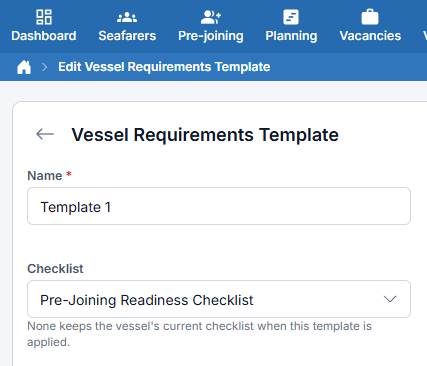
When you use Apply requirements on a vessel, a checklist selected in the template becomes that vessel's default. None leaves the vessel's current checklist unchanged; it does not clear it. To clear the default, use Remove on the vessel's Checklist bar.
The checklist setting from an applied template affects future checklist assignments only. Existing checklist instances and their completed items are preserved.
Payments in a Vessel Requirements Template
A Vessel Requirements Template has the tabs Ranks, Documents, Matrix, Payments, Payroll Rates, and Invoice Rates. Configure the payment tabs in the same way as on the vessel's Payments tabs. The payments apply to the ranks of the template. Click Save changes to save the template together with its payments.
Removing a rank from the template also removes the payments of that rank when you save.
When you use Apply requirements on a vessel, the template's payments are copied to the vessel together with its ranks and documents. They replace the vessel's current payments. The Applied template line above the requirements tabs shows the template that was applied.
When you change the vessel's ranks, documents, or payments and save, the link to the applied template is cleared.
Candidates

- The list of documents.
- Severity of search criteria application.
The list of candidates who meet the conditions defined in the Requirements section in the "documents-positions" matrix. Each line contains a nested list of the seafarer's documents. If the seafarer does not have a certain document, it will be highlighted in red. If the document has already expired, it will be marked in yellow.
In strict search mode, only candidates that fully meet the criteria will be displayed. In the non-strict mode, candidates who have at least one corresponding document will be displayed.
Certificate Matrix
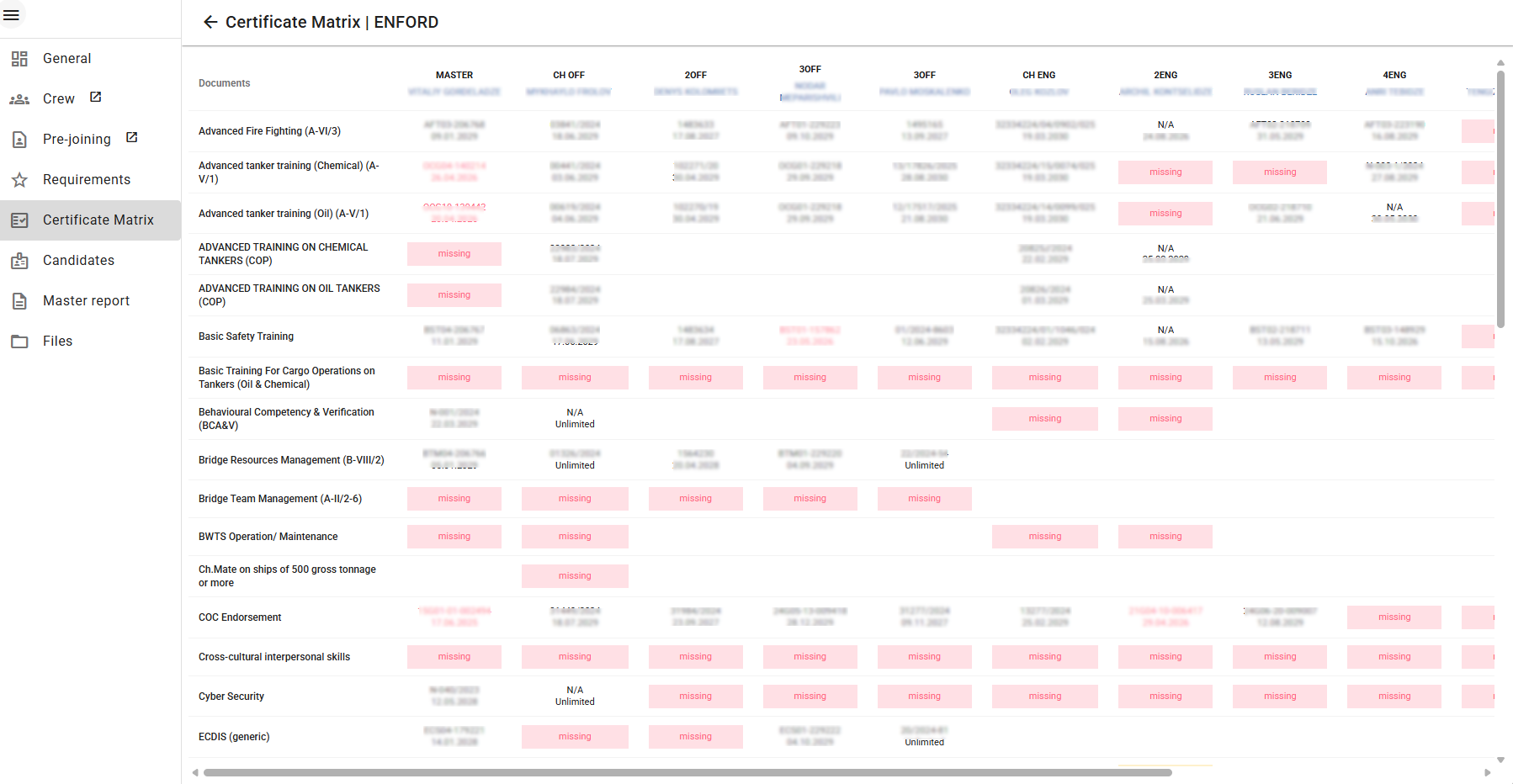
This is a table that displays the current certificate status for the vessel's crew. The left column contains all documents specified in the Requirements section for the vessel. The top row lists the current crew members of the vessel. At the intersection of each document and crew member, the document number and expiration date are shown. Color coding indicates the document status:
- Red text: the certificate has expired.
- Red cell with "missing": the seafarer does not have the required document.
- Yellow text: the certificate expiration date is approaching and will soon expire.