Dashboard

The Dashboard is the start page of the application. It gives a quick overview of crew document readiness, upcoming crew changes, replacement needs, and recent activity.
Widgets
- Crew Document Readiness - Operational readiness of planned and onboard crew. Shows the counters Critical, At risk, On track, and Total, and a list of seafarers with critical document issues (rank, status, vessel, expiring or missing documents). Readiness is calculated against the Company Matrix and vessel document requirements. View more opens the Crew document readiness report with the full list;
- Crew change schedule - Upcoming sign-ons and sign-offs, with document issues and checklist progress;
- Replacement Needed - Onboard seafarers approaching sign-off without an assigned reliever;
- Last viewed vessels - The vessels recently viewed by the user;
- Last viewed seafarers - The seafarer profiles recently viewed by the user;
- Last online applicants - Seafarers recently registered through the online application form;
- Favorites - Seafarer profiles added to favorites;
- Shared profiles - Seafarer profiles published via a special link;
Crew-on-board totals are available in Company statistic. Open positions by joining urgency are available in Vacancies statistic.
Crew change schedule
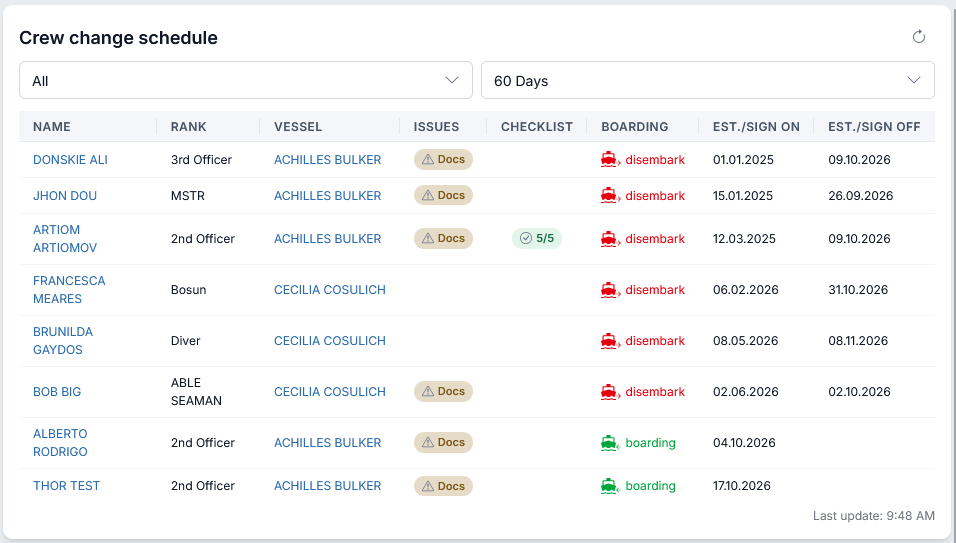
Shows your agency's seafarers whose sign-on or sign-off falls within the selected period. Completed voyages are excluded. Seafarers appear whether or not a reliever has been assigned.
- boarding (green): sign-on falls within the period.
- disembark (red): sign-off falls within the period and sign-on does not. If both dates fall within the period, the row shows boarding.
- Docs: click to view document issues.
- Checklist: completed items / total items. Click to view and update the checklist.
Click a seafarer's name to open their profile or a vessel name to open its Pre-Joining board.
Replacement Needed
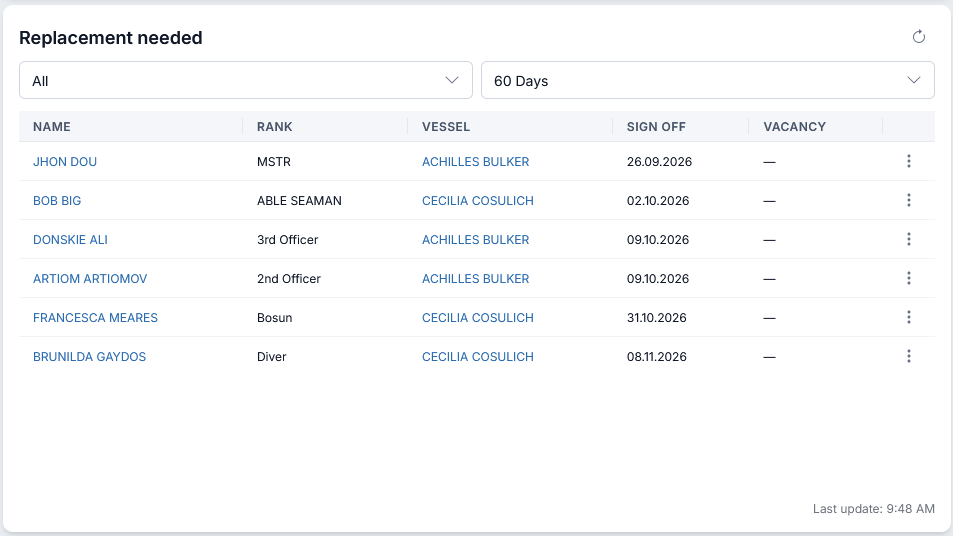
Shows your agency's onboard seafarers whose sign-off falls within the selected period and who have no assigned reliever. The earliest sign-offs appear first.
A reliever must be explicitly linked to the departing seafarer's voyage and have a voyage in Planning, Joining, or On Board status. Once assigned, the departing seafarer disappears from this list after refresh. A completed reliever voyage does not count.
Vacancy shows a clickable vacancy number when an open vacancy matches the exact vessel and rank, with a joining date within the selected period. Joining may be before or after the sign-off date. ASAP vacancies without a joining date and vacancies without a specific vessel do not match. — means no matching vacancy was found. A matching vacancy does not remove the seafarer from the list.
Use the ⋮ menu to:
- Create vacancy — available when no matching vacancy is shown. Opens a new vacancy with vessel, rank, and joining date prefilled; joining defaults to the sign-off date. Review the details and save.
- Go to Pre-Joining — opens the vessel's planning board to arrange a reliever.
Filters for both widgets
Select an assigned manager or All, then 14, 30, or 60 Days, starting from today. The manager filter applies to the voyage's assigned manager. Each widget remembers your selections separately after a page reload. Click the refresh icon to reload that widget; Last update shows when its data was last loaded.
Main navigation menu
- Dashboard - Application start page;
- Seafarers - Seafarers manager;
- Pre-joining - Voyage planning board, from candidate consideration to boarding;
- Planning - Seafarers voyage planning (Gantt chart);
- Vacancies - Vacancies manager;
- Vessels - Vessels manager;
- Reports - System reports menu;
- Finance - Contracts, billing, invoices, payroll, and payslips;
- Catalogs - Additional catalogs menu (Ranks, Flags, Nationalities, etc.);
- Files - Company files storage;
- System - Administration: Offices, Users, Users roles, Templates, Users activities, Company Matrix, and Checklists;
Other elements
- Quick seafarer search by name (the search field in the top bar);
- User's menu:
- Settings - User and system settings;
- Log out;