Seafarer profile
The seafarer profile is the single place where everything known about a seafarer is stored: personal data, contacts, sea service, documents, education, appraisals, bank details and more. It opens whenever you select a seafarer from the Seafarers list.
The page is organised as a left-hand navigation menu (the list of sections) and a content area that shows the selected section. A toolbar runs along the top of the profile.
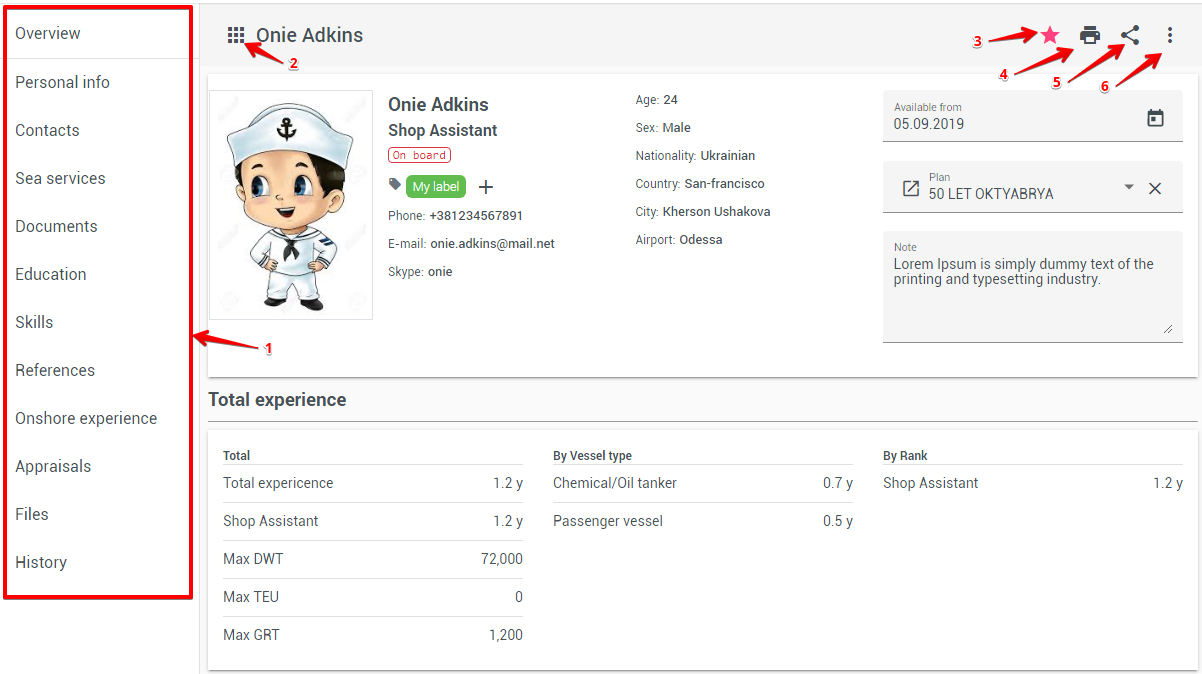
Page layout and toolbar
The toolbar at the top of the profile contains:
- Back – returns to the previous page;
- Export – exports the profile to a template. When more than one template is available you can choose which one to use;
- Favorite (star) – adds the seafarer to, or removes them from, your favorites for quick access;
- Share – generates a link that lets the profile be viewed without signing in to the system (available with the corresponding permission); see Shared profile;
- Archive – performs a "soft" deletion. The profile is removed from everyday lists but the record is kept in the database and can be restored later;
- Verify – appears only for a seafarer added as an applicant who has not yet been verified. Confirming verification marks the applicant's data as checked.
If you start editing a section and leave without saving, an unsaved-changes notification warns you so your edits are not lost.
The navigation menu on the left can be collapsed to icons only (using the menu button at its top) to give the content more room, and re-expanded the same way. On smaller screens it opens as a slide-in drawer.
Overview
The Overview is the landing section of the profile and gives an at-a-glance summary of the seafarer.
- Seafarer's photo (a button to delete the photo appears when you hover over it);
- Seafarer's name, main rank and, when set, the second rank;
- Seafarer's current status;
- Internal code and system ID (click the copy icon to copy either value);
- Attached labels with a button for adding or changing them;
- Seafarer's contact information (phone, e-mail, WhatsApp, Telegram, Teams). Click a quick-action link to start a chat: WhatsApp and Telegram open the chat in the messenger, and Teams opens a chat in Microsoft Teams;
- Basic personal information (age, gender, nationality, address, nearest airport);
- Available from – the date when the seafarer is ready for the next contract. Until this date, the seafarer has the "unavailable" status;
- Currently planned vessel, with a link to Planning and the option to detach the vessel (this also removes the related current contract information);
- Total experience summary;
- Notes about the seafarer.
The bottom of the summary card also shows when the profile was created and last updated, and by whom.
Statuses
- Available - The seafarer is available to plan a new voyage;
- Unavailable - The seafarer is unavailable for planning;
- Planned - The seafarer has been assigned to the vessel and is pending;
- Joining - The seafarer is in the process of boarding a ship;
- On board - The seafarer is on board;
Labels
For marking profiles and for more convenient search, the user can create a random number of labels/tags.
Total experience
- Overall seafarer's experience;
- General seafarer's experience by main rank;
- Maximum DWT of the vessel on which the seafarer sailed;
- Maximum TEU of the vessel on which the seafarer sailed;
- Maximum GRT of the vessel on which the seafarer sailed;
- Seafarer's experience by vessel types;
- Seafarer's experience by rank;
Working with list sections
Several sections (Sea services, Documents, Education & skills, References, Onshore experience, Appraisals and others) present their data as a table and share the same controls:
- Search – quickly filter the list;
- Add – create a new entry;
- Column settings – choose which columns are shown;
- Edit – open an entry to change it;
- Additional actions – a per-row menu with extra operations such as delete or export.
Personal info
The seafarer's personal information (full name, date and place of birth, nationality, identification details, addresses, and so on). Edit the fields and save to update the profile.
Contacts
The seafarer's own contact details (phones, e-mail, messengers, addresses). The messenger fields include:
- WhatsApp – the seafarer's WhatsApp number;
- Telegram – a Telegram username (for example,
@ivan_petrov) or a phone number; - Teams – the seafarer's Microsoft Teams account, usually an e-mail address.
The profile summary card and the detail panel in the Seafarers list show these fields with quick-action links to start a chat with the seafarer.
Next of Kin
The contact details of the seafarer's next of kin – the relative or representative to reach in case of an emergency. You can record the relative's name and relationship, date of birth, country, city, address, phone numbers and e-mail. A shortcut is available to copy the seafarer's own address into the next-of-kin address fields.
Sea services
The list of the seafarer's completed voyages. Past voyages can be added here to build up the seafarer's experience record.
In addition to the common list controls, a marker shows when a voyage was operated with your own company.
Employment contracts
Available when the finance module is enabled.
The list of the seafarer's employment contracts. From here you can review each contract, export a contract to a template, and delete a contract that is not yet permanent. See Employment contracts for details.
Documents
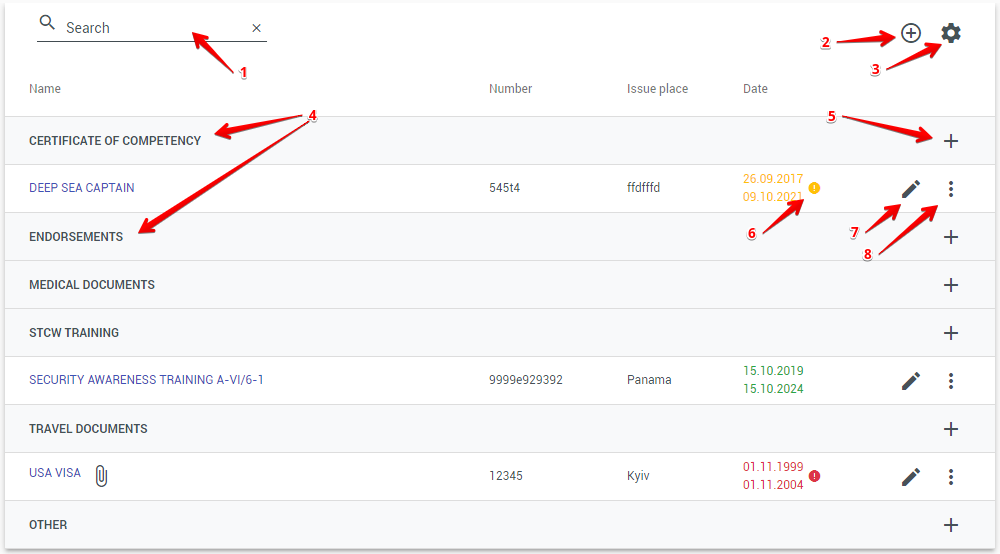
List of seafarer's documents. All documents are divided into 6 categories. To add a new document type, see the Documents catalog.
- Quick list search;
- Add a new entry;
- Setting the display of table columns;
- Document categories:
- CERTIFICATE OF COMPETENCY;
- ENDORSEMENTS;
- MEDICAL DOCUMENTS;
- STCW TRAINING;
- TRAVEL DOCUMENTS;
- OTHER;
- Add a new entry within the category;
- The icon and color indicate the remaining validity of the document:
- Green - More than 1 year;
- Yellow - 6 months to 1 year;
- Red - Expired or less than 6 months left; (Upon hovering over the icon, a hint will be shown how much time is left)
- Edit the entry;
- Additional actions;
If a file is attached to the document record, you can download it by clicking on the paperclip icon without opening the document card;
AI-Powered Document Processing

A document upload area allows automatically extracting document information using AI. After uploading files, Crewvector automatically recognizes and extracts document information. Before the document is saved, users can review and verify the extracted data, ensuring accuracy while significantly reducing manual data entry.
Education & skills
The seafarer's education and qualifications, managed with the common list controls.
This section is also where you record the seafarer's language skills and the level of knowledge for each. New languages can be added via the Languages catalog (see Catalogs).
References
Reviews and recommendations about the seafarer, managed with the common list controls.
Onshore experience
The seafarer's work experience ashore, managed with the common list controls.
Appraisals
The seafarer's appraisals (assessment records). An appraisal can be made when hiring a seafarer or at the end of their service. Entries are managed with the common list controls.
Bank
The seafarer's bank account details.
Files
Additional files attached to the seafarer that do not belong to a specific section.
- Upload a file;
- Preview a file;
- Download a file;
- Additional actions.
History
The planning history of the seafarer – a chronological record of planning events (assignments, changes and removals) so you can trace how the seafarer has been planned over time.
When a user restores a voyage from the Sign-off history on the Pre-Joining board, the history shows a Restore entry with the user and the comment. The earlier sign-off entry stays in the history.