Pre-Joining
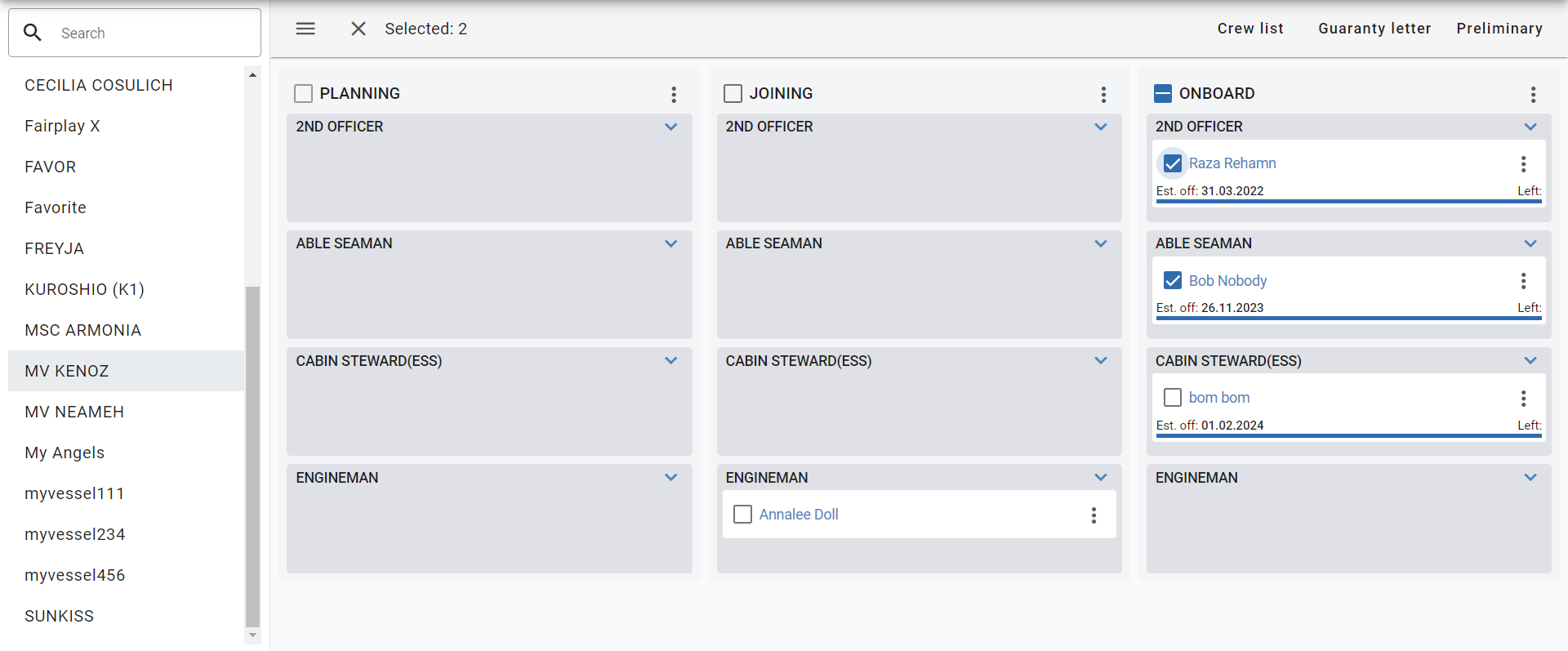
This module is designed for planning the voyages of seafarers, from the stage of considering candidates to boarding the vessel. In the main working area, there are 3 columns that reflect different planning stages.
To add a new seafarer to the plan, click the Add Seafarer button in the upper right corner. After adding a seafarer to the plan, you can move him between columns, as well as edit and delete.
Sorting of seafarers in each column is done by the priority of the rank (see the Ranks catalog);
Planning stages
There are 3 planning stages in the system:
- Planning - The seafarer is at the stage of considering his candidacy;
- Joining - The seafarer is at the stage of boarding the vessel (preparation of documents, etc.);
- On board - The seafarer is on board;
Sign-off history
Use the sign-off history to return a seafarer to On board after a sign-off by mistake. For example, the contract was extended and the seafarer stays on board.
When a vessel is selected, the toolbar shows the History button next to the Add Seafarer button. The button is available to users who can edit planning.
Click History to open the Sign-off history dialog for the selected vessel. The dialog lists the seafarers signed off from this vessel in the last 30 days, newest first. The columns are:
- Seafarer;
- Rank;
- Signed off - the sign-off date;
- Signed off by - the user who signed off the seafarer;
- Reason - the sign-off reason;
- The Restore button.
The list shows only the last voyage of a seafarer. If the seafarer already has a newer voyage (planned, joining, on board, or a later completed voyage), the record does not appear in the list.
Restoring a voyage
- In the Sign-off history dialog, click Restore in the row of the seafarer.
- In the Restore voyage? confirmation, check the Comment field. The default comment is "Erroneous sign-off (contract extension)". Change it if necessary. The comment is required.
- Confirm the action.
After the restore:
- The voyage returns to On board with the original voyage dates. The sign-off date does not change. If necessary, edit the dates in planning;
- The seafarer is shown as on board again;
- The employment contract is no longer marked as completed;
- The record leaves the sign-off history list.
The system records the action. The seafarer's planning History shows a new Restore entry with the user and the comment. The earlier sign-off entry stays in the history.
Other users who have planning notifications turned on receive a notification that the seafarer was restored on board, with the comment.
Checklists
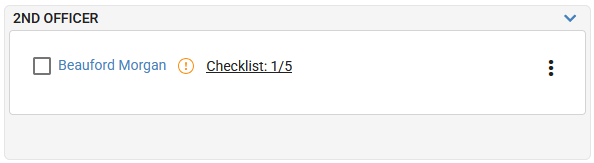
When a new plan is created, the vessel's default checklist is assigned automatically if one is configured. You can also assign a checklist to a seafarer from the context menu of the voyage information card.
Changing the vessel default later does not replace the checklist or reset progress on an existing plan.
After a checklist is assigned, the voyage information card displays:
- The total number of checklist items;
- The number of completed checklist items.
Replacement assignments
You can select the seafarer being replaced during Planning or Joining, before sign-on. The available choices are eligible sea-service records for the same vessel and rank. The selected replacement is retained when you proceed to sign-on.
Changing the vessel clears existing replacement assignments for the selected seafarers, including links from seafarers assigned to replace them. This also applies when changing the vessel for several selected seafarers. Read the warning before confirming, then review the replacement assignments on the new vessel.
Requirement compliance
The voyage information card can also display an exclamation mark icon. This icon indicates a requirements violation for either vessel-specific requirements or company-wide requirements (for example, missing valid seafarer documents).
When you click this icon, the system displays a list of missing documents.
The system checks document availability and validity according to both vessel requirements and the general document matrix.
Reports
To create reports such as: Crew List, Letter of Guarantee, Preliminary, you need to select seafarers that should be included in the new report and click on the corresponding report button. After that, the user will go to the report creation page, where he can make the necessary changes and save. After saving the report, it can be exported.
