Crew Change report
Open Reports → Crew Change report to review crew movements for a selected period.
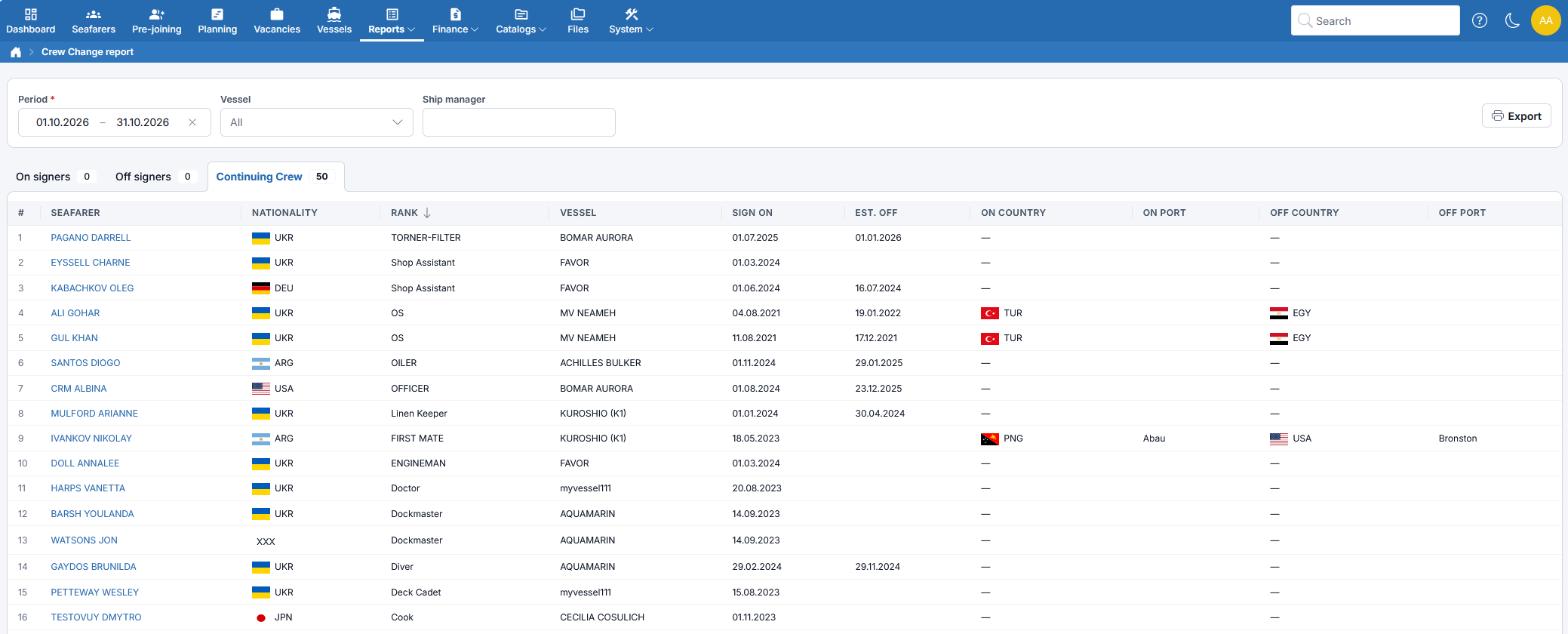
Filters and tabs
- Select the required Period.
- In Vessel, choose one or more vessels, or leave All to include all vessels matching the other filters.
- Optionally select a Ship manager to narrow the report.
- Switch between the three tabs. The number next to each tab is the number of records in that group.
- On signers — crew members who joined during the selected period.
- Off signers — crew members with a completed voyage and an actual sign-off within the period.
- Continuing Crew — crew members who joined before the period and have not actually signed off, or signed off after the period ends.
A crew member can appear in both On signers and Off signers if both movements occurred within the period. An overdue estimated sign-off date does not by itself remove an onboard seafarer from Continuing Crew.
Columns
The report shows:
- # — row number within the selected group;
- Seafarer - Seafarer's name (opens the seafarer's profile);
- Nationality — nationality flag and country code;
- Rank - Seafarer's rank;
- Vessel - Vessel of the voyage;
- Sign on - Boarding date;
- Sign off — actual disembarkation date, shown on the Off signers tab;
- Est. off — estimated sign-off date, shown on the On signers and Continuing Crew tabs; it is empty for a completed voyage;
- On Country / On Port - Country and port where the crew member boarded;
- Off Country / Off Port - Country and port where the crew member signed off.
A date under Sign off always means the crew member has left the vessel. A date under Est. off is only a plan — the crew member is still on board.
Export
Click Export, select Default built-in template or a custom template, and choose whether to export as PDF. With the built-in template and PDF turned off, the report is exported to Excel.
The export uses the selected period, vessels, and ship manager and includes all three crew groups, not only the active tab. Row numbering starts at 1 in each group. See Choosing an export template.
Attributes
| Attribute | Type | Description |
|---|---|---|
| CompanyLogo | Image | Company logo for templates that include it |
| Vessel | Vessel | Vessel information when exactly one vessel is selected; otherwise empty. Use each item's SeaService vessel for fleet reports |
| Port | Port | Port information |
| StartDate | Date | Start date of the reporting period |
| EndDate | Date | End date of the reporting period |
| ContinuingCrew | List of Crew Change Item | List of continuing crew members |
| OnSigners | List of Crew Change Item | List of crew members who joined during the period |
| OffSigners | List of Crew Change Item | List of crew members who signed off during the period |
Vessel
| Attribute | Type | Description |
|---|---|---|
| Id | Integer | Unique identifier |
| Name | String | Vessel name |
| Flag.Name | String | Vessel flag name |
| Flag.IsoCode | String | Vessel country code |
| EngineType.Name | String | Type of vessel engine |
| EngineModel.Name | String | Model of vessel engine |
| VesselType.Name | String | Type of vessel |
| Owner.Name | String | Vessel owner |
| Manager.Name | String | Vessel manager |
| InvoiceTo.Name | String | Invoice recipient |
| Principal.Name | String | Principal |
| Year | Integer | Year of construction |
| Dims | String | Vessel dimensions |
| Tonnage | Integer | Gross tonnage |
| Dwt | Integer | Deadweight tonnage |
| Cargogear | String | Cargo gear information |
| Speed | Integer | Vessel speed |
| EngineHp | Decimal | Engine horsepower |
| Mms | String | MMS number |
| CallSign | String | Call sign |
| Imo | String | IMO number |
| Comment | String | Additional comments |
| EngineWt | Decimal | Engine power in watts |
| CargoPumpType.Name | String | Type of cargo pump |
| CargoTanks | Integer | Number of cargo tanks |
| Teu | Integer | Twenty-foot equivalent unit capacity |
| Geared | Boolean | Whether vessel is geared |
| OnBoard | Integer | Number of crew on board |
| Planning | Integer | Number of crew in planning |
| Joining | Integer | Number of crew joining |
| SignOff | Integer | Number of crew signing off |
| String | Vessel email | |
| Phone | String | Vessel phone |
Port
| Attribute | Type | Description |
|---|---|---|
| Name | String | Port name |
| Code | String | Port code |
| Country.Name | String | Country name |
| Country.IsoCode | String | Country Code |
Crew Change Item
| Attribute | Type | Description |
|---|---|---|
| Index | Integer | Row number, starting at 1 separately within each crew group |
| Sailor | Seafarer | Seafarer information |
| SeaService | Sea service | Sea service information |
| SignOff | Date | Actual sign-off date. Empty if the crew member is still on board |
| EstSignOff | Date | Estimated (planned) sign-off date. Empty once the crew member has actually signed off |