Vacancies
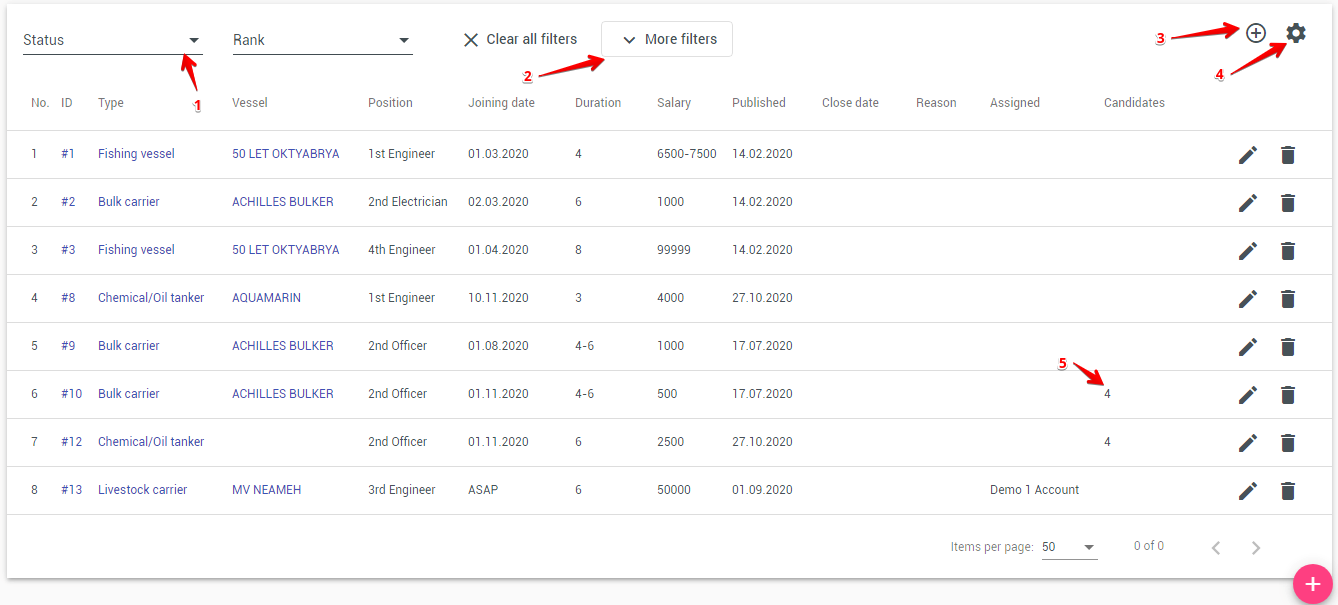
The Vacancies module allows you to manage open positions and quickly find suitable candidates from your internal seafarer database.
The module consists of:
- The Vacancies List
- The Vacancy Details Page, including the new Matched Candidates panel
1. Vacancies List
The visual structure of the vacancies list remains unchanged.
The page contains:
- Filters for Rank, Vessel type, Vessel, and Status
- A table displaying:
- ID
- Vessel
- Vessel type
- Rank
- Joining date
- Salary
- Published
- Candidates (number of candidates linked to the vacancy)
- Create date
- Status
- Action buttons:
- Add record — create a new vacancy
- Edit — modify an existing vacancy
Sorting, filtering, and navigation work the same way as before.
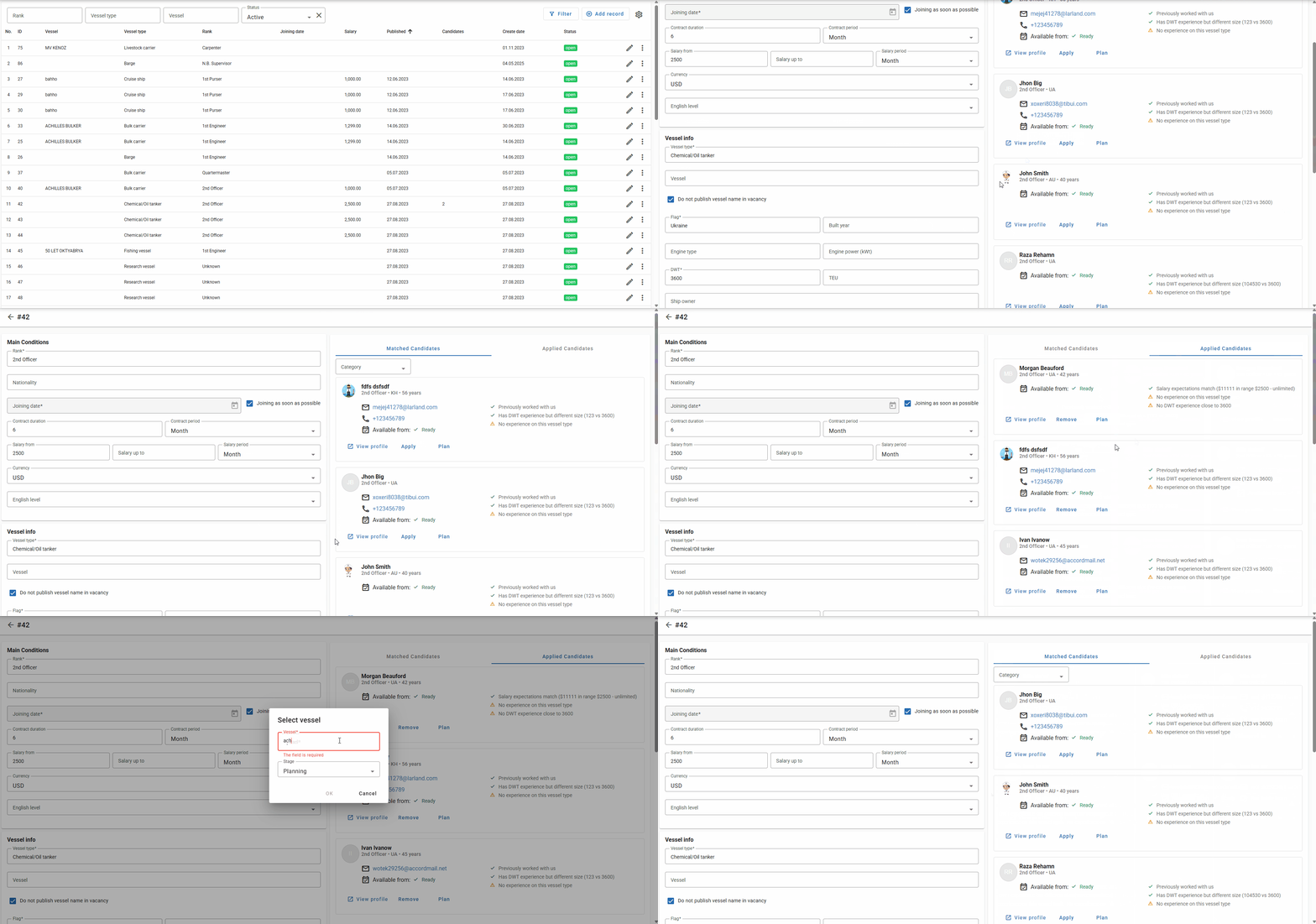
2. Vacancy Details Page
The vacancy page is divided into two sections:
- Main Conditions
- Candidate Panels (Matched Candidates / Applied Candidates)
2.1 Main Conditions
This section contains the vacancy requirements and inputs:
- Rank, Nationality
- Joining date and checkbox Joining as soon as possible
- Contract duration and Contract period
- Salary from, Salary up to, and Salary period
- Currency
- English level
- Vessel type
- Vessel
- Checkbox Do not publish vessel name in vacancy
The layout and functionality of the form remain the same as in the previous version.
2.2 Matched Candidates
This is a new panel on the right side of the vacancy page.
It displays seafarers automatically matched to the vacancy based on the internal ranking algorithm.
For each matched candidate, the system shows:
- Name, rank, and nationality
- Contact details (email, phone)
- Availability date
- Indicators showing why the candidate matches or does not match:
- ✔ Criteria that match
- ⚠ Criteria that do not match or are missing
- Notes such as:
- Previously worked with us
- Has DWT experience but different size
- No experience on this vessel type
Each candidate card contains three actions:
View profile
Opens the full seafarer profile.
Apply
Marks the seafarer as an applicant for this vacancy.
The candidate then appears in the Applied Candidates section.
Plan
Adds the seafarer to vessel planning.
You can choose one of the planning stages:
- Planning
- Joining
- On Board
2.3 Applied Candidates
This section contains:
- Seafarers who applied through the external online application form
- Seafarers manually added via the Apply button
The interface remains similar to previous versions, but now it is displayed together with the Matched Candidates panel.
2.4 Share Vacancy
You can share a vacancy via LinkedIn and Facebook using the Share buttons on the vacancy page. When a user clicks a Share button, the system opens the corresponding platform's share page (in a new tab) and automatically copies a pre-formatted vacancy text to the clipboard. The copied text includes the vacancy title, rank, vessel (unless hidden by the "Do not publish vessel name in vacancy" option), joining date, salary range, and a short link to the vacancy — the user only needs to paste the text into the platform's post composer.
Note: If the vacancy has the "Do not publish vessel name in vacancy" checkbox selected, the vessel name will be omitted from the copied text for privacy.
3. Candidate Matching Algorithm
The system automatically selects and ranks candidates for each vacancy.
Below is a concise explanation suitable for user documentation.
3.1 Candidate Pre-Filtering
Only seafarers who meet the basic criteria are considered:
- Rank must match the vacancy rank
- Deleted or currently assigned seafarers are excluded
- Nationality must match allowed nationalities (if specified)
- Optional filters may exclude already applied or under-consideration candidates
3.2 Scoring Criteria
Each candidate receives a score based on the following factors:
Experience
- Vessel type experience (months within last 5 years)
- Engine type experience
- DWT similarity (better match → higher score)
Salary Expectations
- Candidate's minimum expected salary is compared with the vacancy's salary range
English Level
- Candidate must meet or exceed the required English level
Documents & Visas
- Required documents are checked for availability and validity
- If the vacancy requires visas (USA / Schengen), system checks their presence
Readiness
- Candidate receives additional points if the availability date is close to the joining date
Worked With Us
- Seafarers who previously worked with the company receive a bonus score
Minimal Experience in Rank
- Seafarers who have at least the minimum required experience in the specified vacancy rank
3.3 Match Explanation
For each candidate, the system displays:
- Matched criteria (✔)
- Missing or non-matching criteria (⚠)
- Document warnings (missing, expired, expiring)
- The final Score
3.4 Ordering
Candidates are sorted by:
- Score (highest first)
- Previous cooperation with the company (those marked as "our sailors")
- Name (alphabetical)
A global minimum score may be applied to hide low-quality matches.
4. Summary
The updated vacancy page now provides:
- A fully integrated automatic candidate matching system
- Clear explanations why each seafarer fits or does not fit
- Quick actions for applying or planning candidates
- A unified view of matched and applied candidates
This significantly speeds up recruiting and provides full transparency of selection criteria.
5. Integration With the Company Website
Vacancies can be integrated into the company's public website.
To enable this, a special HTML element can be inserted into the target page. For integration setup, please contact your system administrator.
Closing Vacancy
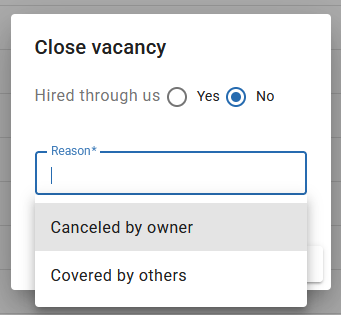
When you close a vacancy, a dialog appears with the following options:
- Hired through us — select Yes if you hired a candidate through your company, or No if the position was filled differently or remains unfilled.
If "Hired through us" is set to Yes, the Closing reason field becomes optional.
If "Hired through us" is set to No, you must type a Closing reason or select from the dropdown list. If you need to add a custom closing reason to the dropdown, please contact us.
