Catalogs
All data in the specified directories below can be edited
General
- Flags
- Rangs
- Managers
- Crewing agencies
- Nationalities
- Inspections
- Agents
- Medical centers
- Languages
Catalogs used in sailors' documents
- Documents
- Issue authorities
Catalogs used in sailors' education
- Specialities
- Educational institutions
Catalogs used in sailors' assessment
- Indicators
- Indicator types
Catalogs used in vessels
- Vessel types
- Engine types
- Engine models
- Types of cargo pumps
- Cargoes
- Trading areas
- Ports
User actions: Merge and Bulk delete
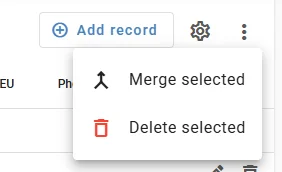
Some catalogs support two bulk operations that help you manage many records at once: Merge and Bulk delete.
The following catalogs support the Merge and Bulk delete actions:
- Vessels
- Vessel types
- Engine types
- Engine models
- Ranks
Follow the short instructions above to perform these actions on the listed catalogs.
Merge
Combine several selected records into one: - Select the records you want to merge by checking their checkboxes. - Choose the menu item "Merge selected". - The program will ask you to choose the target record. The target is the record that will remain and replace all links to the other selected records. - After confirmation, the program deletes the other selected records and replaces links to them with the chosen target.
Bulk delete
Delete several selected records: - Select the records you want to delete by checking their checkboxes. - Choose the menu item "Delete selected". - The program will remove the selected records only if they are not used elsewhere. If a record is in use, it cannot be deleted until references are removed.
These actions make it easy to clean up duplicates and remove unused items. Use them carefully — merging and deleting cannot be undone.
